Are You Getting Yuzu Encryption Keys Are Missing (Nintendo Switch Emulator)? Many people use the Yuzu emulator to play Nintendo Switch games.
Millions of people are currently using the Yuzu emulator to play Nintendo Switch games. This emulator is available for both Windows and Linux operating systems.
Recently there are many people who are showing “Yuzu Encryption Keys Are Missing” error message while installing Yuzu emulator. With this error message, the user gets a complete guide and it is told about the error.
Many people do not understand this error, and they keep installing the emulator again and again. Even after trying a lot, they do not get the solution to the problem.
In this guide, we will learn how to fix Yuzu Encryption Keys Are Missing (Nintendo Switch Emulator).
What is Nintendo Switch Yuzu Emulator?
Yuzu is an open-source free emulator for the Nintendo Switch. Through this emulator, we will be able to play Nintendo Switch games on Linux and Windows PC.
This emulator was created and released on January 14, 2018, by Nintendo 3DS Emulator Citra. This complete emulator has been developed inthe C++ programming language.
This emulator can run many Nintendo Switch games, including Minecraft, Super Mario, FIFA 23, and many more.
Why Does the “Encryption Keys Are Missing” Error Appear?
When you launch Yuzu without properly setting up the prod.keys and title.keys, you’ll encounter the “Yuzu Encryption Keys Are Missing” or “Derivation Components Missing” error.
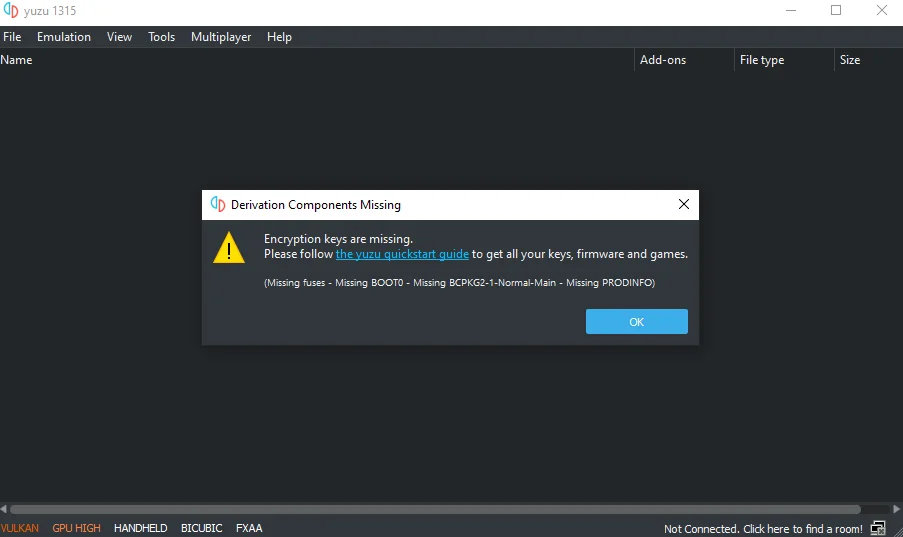
- Cause 1: The emulator cannot decrypt and load Switch games without the necessary keys.
- Cause 2: The required prod.keys file is missing from Yuzu’s keys folder.
Without these keys, the emulator cannot run any Nintendo Switch games.
How to Fix Yuzu Encryption Keys Are Missing
To resolve this issue, you need to add the prod.keys and title.keys files to Yuzu’s keys folder. Follow the steps carefully:
Step 1: Download Prod Keys
- Visit this page https://uzuyxemulator.com/prod-keys-and-title-keys/.
- Download the latest Prod Keys in a compressed (.zip) format.
Step 2: Extract the Keys
- Unzip the downloaded file.
- Inside, you will find two files:
prod.keystitle.keys
Step 3: Open Yuzu Emulator Folder
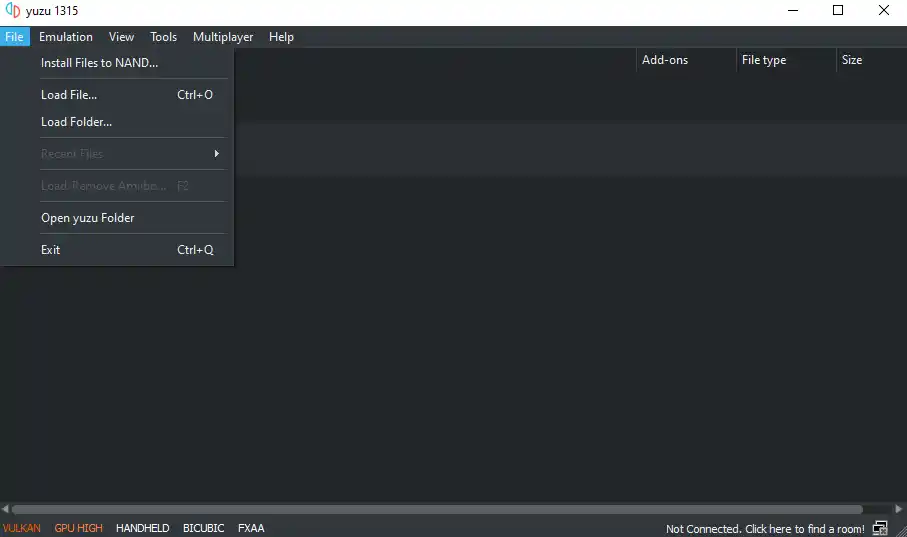
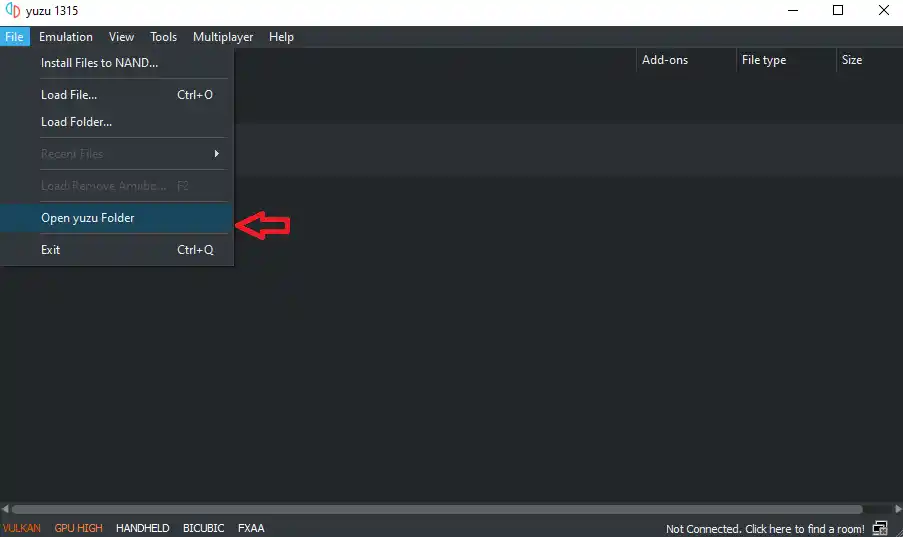
- Launch the Yuzu emulator.
- Click on File > Open Yuzu Folder.
Step 4: Locate or Create the Keys Folder
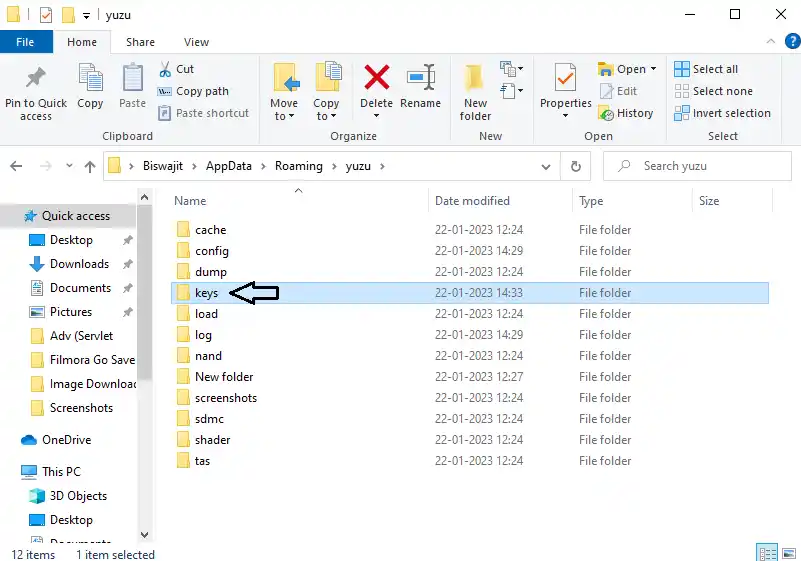
- Inside the Yuzu folder, find a folder named keys.
- If the folder doesn’t exist, create a new one and name it keys.
Step 5: Copy and Paste Keys
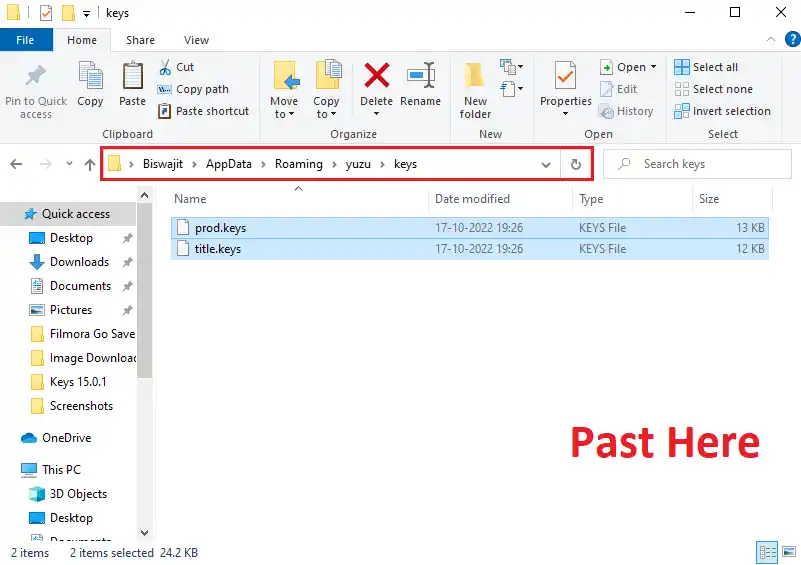
- Copy
prod.keysandtitle.keysfrom the unzipped folder. - Paste them into Yuzu’s keys folder.
Step 6: Restart Yuzu
- Close the emulator completely.
- Relaunch Yuzu.
Now the “Encryption Keys Are Missing” error should be gone, and your emulator will be able to load Nintendo Switch games properly.
Final Thoughts
The Yuzu Encryption Keys Are Missing error is one of the most common issues new users face. The fix is simple: just place the correct prod.keys and title.keys in the Yuzu keys folder.
Once done, you’ll be able to enjoy Nintendo Switch games like Pokémon, Mario, Zelda, and more without any issues.

![All GPU Drivers for (Android) Download [Snapdragon, Adreno, Turnip] mali gpu driver](https://uzuyxemulator.com/wp-content/uploads/2025/09/All-GPU-Drivers-for-Android-Download-Snapdragon-Adreno-Turnip-mali-gpu-driver-150x150.webp)