To run Nintendo Switch games smoothly on emulators, firmware is often required. While Yuzu can play most games without firmware (only prod keys are essential), Ryujinx needs both firmware and prod keys. The latest Switch Firmware v19.0.1 is now available, ensuring better compatibility and performance across supported titles.
[Latest] Ryujinx & Yuzu Firmware V18.1.0
| Version | MD5 Hash | Size | Download |
| 18.1.0 | dfd91e2bc34ebf81897a2c65723ee396 | 323MB | Download |
Latest Switch Firmwares For (Yuzu or Ryujinx)
| Version | MD5 HASH | File Size | Links |
|---|---|---|---|
| 18.0.0 | 8dbacdbaa4e90be98ed0706f7e90a241 | 323MB | Download Download |
| 17.0.1 | 107f55a13e35efc95c27eca693f93ab7 | 323MB | Download Download |
| Firmware 17.0.0 | 907f7c99ba54ff84aba5dfc9e22df968 | 323MB | Download Download |
| Firmware 16.1.0 | c32db52758a4bf6503869db531012e3d | 325MB | Download Download |
| Firmware 16.0.3 | ebb152b356b94eb95ed4a5ab9d4145f1 | 325MB | DOWNLOAD |
| Firmware 16.0.2 | 462c6a0d29daa4170c37ad1b95899bd5 | 325MB | DOWNLOAD |
| Firmware 16.0.1 | cb287286188dc3072352af2bb4830911 | 325MB | DOWNLOAD |
| Firmware 16.0.0 | 9feda64cab86f851f1630979ae33a6d5 | 325MB | DOWNLOAD |
| Firmware 15.0.1 (Rebootless Update) | 4fe164705b2392592553586f7cf9d03e | 322MB | DOWNLOAD |
| Firmware 15.0.1 | 69735562cebf54ec61aad54cfefc9a5d | 322MB | DOWNLOAD |
| Firmware 15.0.0 | a7023429f85fdd3a40b4661188f5b65a | 322MB | DOWNLOAD |
| Firmware 14.1.2 (Rebootless Update 3) | 36808cdb78b5986d02817e6667dfe15b | 320MB | DOWNLOAD |
| Firmware 14.1.2 (Rebootless Update 2) | 50f2564ce85a0818942c5fc1db20a89c | 320MB | DOWNLOAD |
| Firmware 14.1.2 (Rebootless Update) | f21375202bc25d55733a41d7a2d8978c | 320MB | DOWNLOAD |
| Firmware 14.1.2 | 522d3c4caf11d9874dbd830907f1f36a | 320MB | DOWNLOAD |
| Firmware 14.1.1 | 4e864e134318aa80ac06e7a676eb96d8 | 320MB | DOWNLOAD |
| Firmware 14.1.0 | 778b4e7854afa1a0baa98c44988e68ac | 320MB | DOWNLOAD |
| Firmware 14.0.0 | 816010565838f30b047d0059efa8c3ea | 320MB | DOWNLOAD |
| Firmware 13.2.1 | 881379299c1c9cd2a4b7a90c18c9ea82 | 320MB | DOWNLOAD |
This emulator of Nintendo Switch requires these firmware switches. You can get the latest version files and set them on the Switch Emulator. We have provided both Global Firmware and China Firmware. Now you can set up the latest version file on the Switch Emulator.
The most needed of this file is for Ryujinx emulators. Through this firmware, the “Ryujinx Error ryu 0002 Firmware Not Found” issue can be fixed. If you are facing this issue on the emulator then the firmware file is missing in it. Install this file and easily play the Switch game on the emulator.
How to Install Firmware in Ryujinx Emulator
Installing firmwares in Ryujinx emulator is not an easy task. There is some process in this, after completing which the firmware file can be set up. Without this file, it is not possible to play Switch games on this emulator. So you have to first download the latest version file and set it on the emulator.
Whatever process is mentioned in this list, follow it step by step. After that, you will easily be able to set up this file on the Ryujinx emulator.
Step 1: Open the Ryujinx Emulator.
Step 2: Select “Install Firmware” by tapping on the Tools option.
Step 3: It will show two options: “Install a firmware from XCI” or ZIP “Install a firmware from a directory”.
Step 4: Tap on “Install Firmware from XCI or ZIP” and go to the firmware zip file location.
Step 5: Select the latest version file and tap on the open option.
Step 6: Tap the “Yes” option for confirmation.
After a few seconds, the latest version of the switch firmware will be installed successfully on the Ryujinx emulator.
How to Install Firmwares In Yuzu Emulator
It is not mandatory to install firmware to play Switch games on Yuzu emulator, but if you install it, you will get some advantages.
So let’s know what the process is to install.
Step 1: Download the latest version 15.0.1 firmware.
Step 2: Unzip the downloaded zip file.
Step 3: Open the Yuzu Emulator.
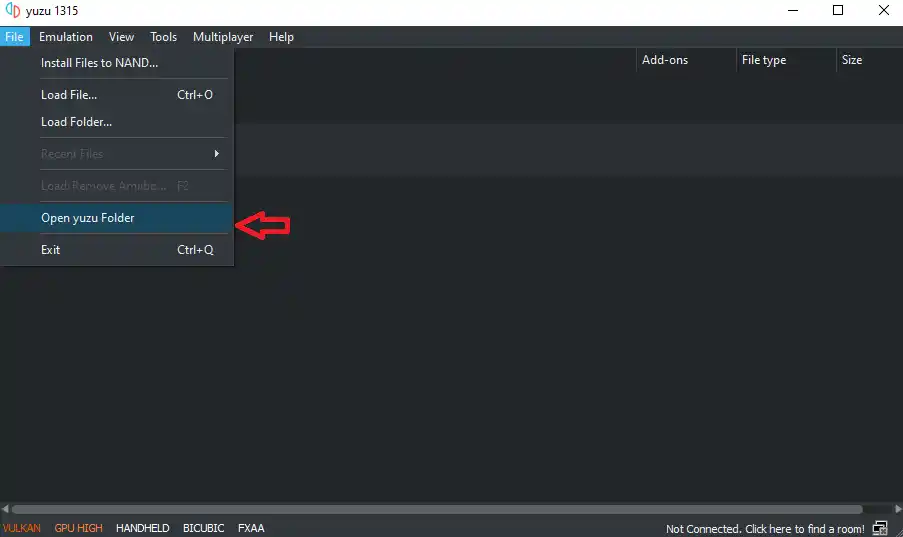
Step 4: Go to “Open Yuzu Folder” by tapping on the file option.
Step 5: After that go to nand>system>Contents>registered.
Step 6: Paste all the unzipped files in the “Registered” folder.
Now the firmware has been successfully installed in the Yuzu emulator, you can take advantage of it during the gameplay.